HTTP File Streaming Client
Description
The HTTP File Streaming Client is an outbound channel which allow to transfer files between local client and a remote HTTP File Streaming Server. This channel can be used for uploading files from specified directory or downloading files to specified directory.
This channel can be configured a number of connections for files transmission in parallel. The channel supports recovery mechanism that allows the re-transmission of the files, whereby already sent/received data will be skipped.
Note: The transferred files are not deleted automatically. Please take care that the deletion of unused files is done when a transmission is over.
Creation
To create Cloud Connector Client, follow the steps described in the general description of Channels
Configuration
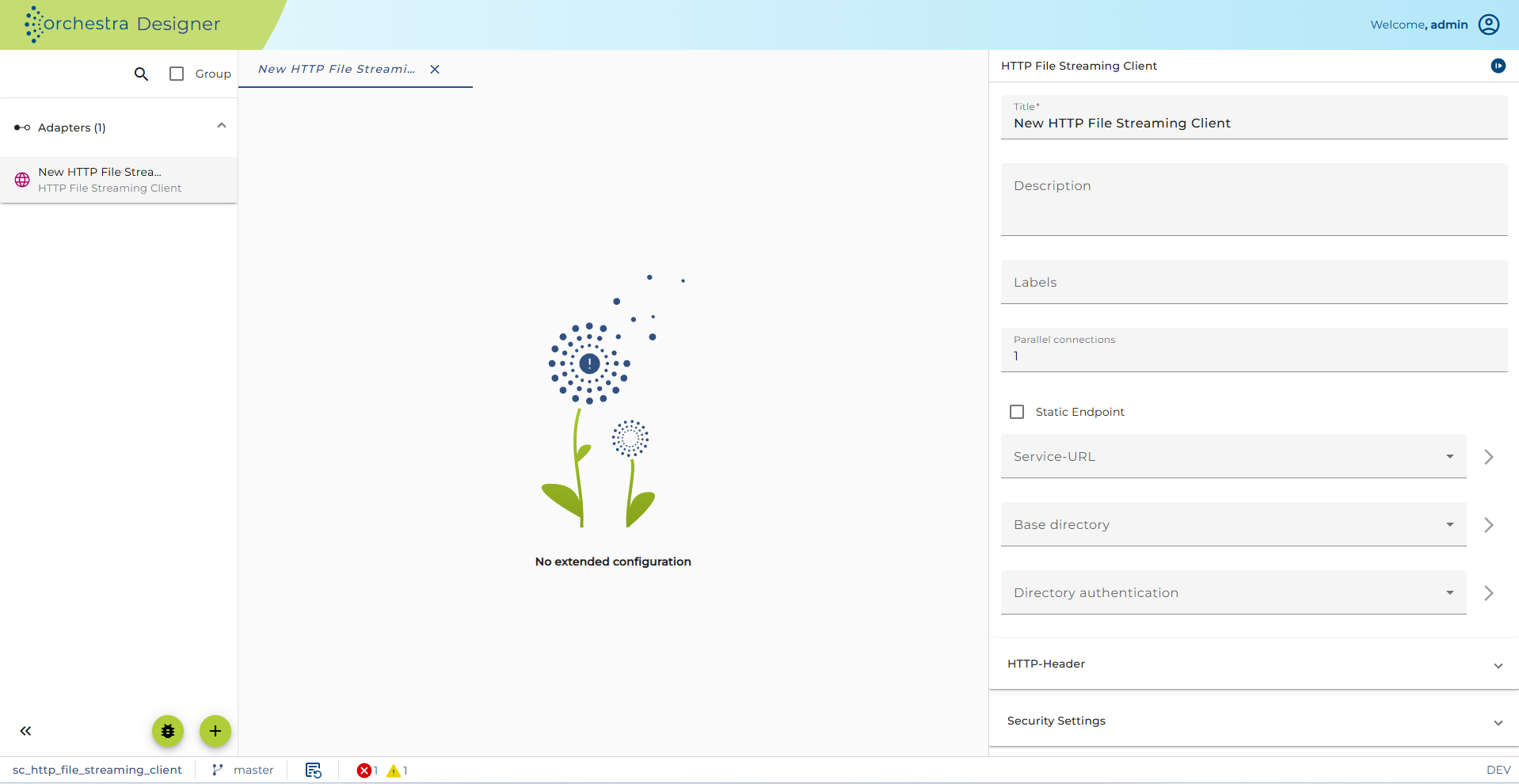
Configuration of the Cloud Connector Client channel
Step by Step
-
Parallel connections a number of the connections will be established in the same time. It also leads to a high throughput.
-
Endpoint Here you may select Static endpoint or Dynamic endpoint. If Dynamic endpoint is selected, the channel has a parameter ctrl_endpoint. The caller has to provide the actual URL as value of this parameter. In this case the URL defined in the Service-URL is not used but a Proxy server defined in the Service-URL is used even if Dynamic endpoint is selected.
-
Service-URL Here an Environment Entry of type Uniform resource locator is selected. It contains the URL to call if Static endpoint is selected. If in the Environment entry a Proxy server is defined it is used even if Dynamic endpoint is selected.
-
Read-Timeout Sets the read timeout. A non-zero value specifies the timeout when reading the HTTP response. If the timeout expires before there is data available for read, an error is raised. A timeout of zero is interpreted as an infinite timeout.
-
Base directory (Optional) Choose an environment entry of type Filepath to be used as a base path of directory.
-
Directory authentication (Optional) Choose a user for log in to access Base directory. This user must be created before.
-
Security settings
-
Authentication here you may select an authentication type. You can select one of:
-
No authorization required
-
Username/Password
-
Use preemptive authentication (Username/Password)
-
Use certificate authentication
If you selected Use certificate authentication then the selected user credential must have PKCS#12 Key Pair. See Credentials for more information about user credentials, and key pairs. See also the best practice story Web Service Security in SOAP web service calls for more information about how to import a Key Pair.
-
-
User-Credentials a user credential of type Technical Login. If you work with No authorization required you need no selection here.
-
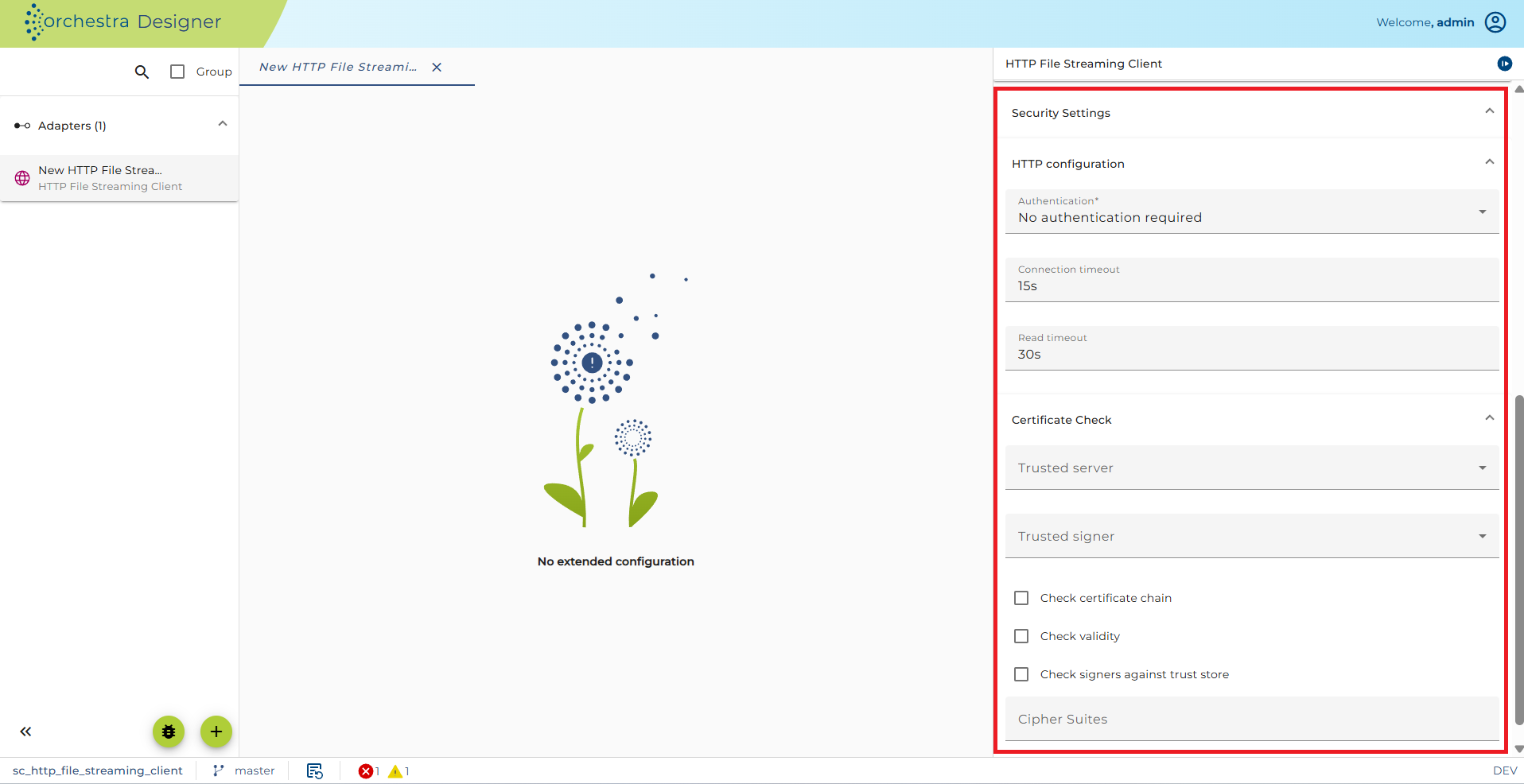
The certificate Check Panel allows a user to configure the client side HTTPS connection details.
-
User-Credentials (type=Technical login): The public/private keypair in pkcs#12 format which should be used for authorization.
-
Trusted server (optional, type=Trusted server): This option allows to check the server's public key certificate which is presented by the server when the client makes a request.
-
Trusted signer (optional, type=Trusted server): Checks whether the server's certificate has been signed by the given certificate and thus can be trusted.
-
Check certificate chain (optional): check if the certificate chain is correctly signed (certificate n is signed by certificate n + 1)
-
Check validity (optional): If set, then check if the certificate is expired.
-
Check signers against trust store: If set, then check that the one certificate in the certificate chain (typically the last one) is contained in the trust store.
-
Cipher Suites (optional): Enforcing specific Cipher Suites to be used in TLS. The cipher suites are added as comma separated values in the text box(e.g. "TLS_ECDH_RSA_WITH_AES_256_CBC_SHA,TLS_ECDHE_RSA_WITH_AES_256_CBC_SHA,TLS_DHE_RSA_WITH_AES_256_CBC_SHA").
Parameters
| Parameter name | Direction | Description |
|---|---|---|
| TRANSMISSION_ID | Ingoing | A string that identifies the transmission uniquely. |
| DIRECTORY_PATH | Ingoing | This parameter defines the absolute/relative directory where the transmission files are located. |
| UPLOAD | Ingoing | Define how the client behaves (upload or pull mode). true: upload mode, send files to the server; false: pull mode, download from the server. |
| ctrl_endpoint | Ingoing | This parameter is visible if you selected Endpoint as parameter. It is used to overwrite the target URL. |
| DYNAMIC_SERVER_URL | Ingoing | Optional parameter to overwrite the Service-URL environment entry. See EnvironmentEntryBuilder for details. |
| DYNAMIC_BASE_DIRECTORY | Ingoing | Optional parameter to overwrite the Base directory environment entry. See EnvironmentEntryBuilder for details. |
| TRANSMITTED | Outgoing | The number of files that have been transmitted the first time. |
| RECOVERED | Outgoing | The number of files that were re-transmitted during the invocation of the channel. |
| SKIPPED | Outgoing | The number of files that have not been transmitted since they already exist at the server side. |
| OVERALL | Outgoing | The overall number of files that belong to the transmission. |
| TARGETDIRECTORY | Outgoing | This parameter holds the absolute path to the directory that contains the data of the transmission. |
See also
Cloud Connector